Free AI assistant for blind and low-vision students

Visionauta, the free app built by a blind software engineer who worked at Google and Samsung has an assistant that sees: it talks by voice without interruptions, describes surroundings, tells the user where they are, searches the internet, reads and plays sheet music, records videos with sound and helps blind people take well-framed photos. Available for iPhone and Android.

Visionauta, the accessibility app that uses artificial intelligence to give more autonomy to blind and low-vision people, announces its new version — and now speaks sixteen languages: Portuguese, English, Spanish, French, Korean, German, Japanese, Italian, Arabic, Russian, Simplified Chinese, Hindi, Bengali, Vietnamese, Turkish and Indonesian. The translation covers the entire app, the voice commands, text reading and also the answers from the artificial intelligence, which talks to users in their own language. With the five new languages, the app now reaches more than a billion speakers across South and Southeast Asia and Turkey.

Every feature of the app can be used without paying, within daily quotas. The optional Visionauta Plus subscription raises those quotas. The app is available for iPhone on the App Store and for Android on Google Play.

See more details at the press release at this URL: https://www.tensorial.com.br/visionauta/press-release/?lang=en


Elmwood Community Hub Launches in Saskatoon

The Elmwood Community Hub is a planned accessible and inclusive community that will bring interconnected support, health and wellness services, and housing together in one place for people with disabilities, their families, and the broader community.

Designed around the belief that everyone deserves opportunities to grow, connect, and thrive, the Hub aims to reduce barriers, foster belonging, and create opportunities for meaningful participation for people with disabilities. To learn more about the Community Hub and its vision, visit https://www.elmwoodhub.com/ .

As part of our commitment to Do With, Not For, we are inviting:

  • People with physical disabilities
  • People with sensory and cognitive disabilities
  • Caregivers and family members
  • Disability sector and accessibility professionals

to share their experiences, perspectives, and ideas as we begin the next phase of design. We’re hoping to hear from a broad range of voices and experiences and would greatly appreciate your support in sharing this opportunity through your networks.

There are engagement sessions happening September 23rd and 24th, 2026. Additional information, including session details and registration, can be found on the Community Hub engagement page: Elmwood Community Hub Lived Experience Engagement.

Changing dates and times of your final exams at AES

Students often ask about moving an exam date and/or time. When it comes to final exams, there are only two situations where AES will adjust your date and/or time of writing:

If you’ve negotiated an alternate date and/or time of writing with your instructor* before the stated deadline

If you need to change the date and/or time for any reason, you must speak with your instructor. This is the case even if you have an accommodation that supports moving your exams (such as “Afternoon/evening exams only”).

For tips on navigating that conversation with your instructor, click here.

When you discuss an alternate date/time, please keep in mind that we have limited exam slots available during the final exam period (April 9-30 in 2026). On these dates, we can only start exams at 9AM, 2PM, or 5PM at the AES Exam Centre. Also, as with most University services, we are closed on all Sundays and on April 3 and 4 (2026) for the long weekend.

When you reach an agreement with your instructor for an alternate date/time, please complete the appropriate section in your Accommodate request form.

*If you are registered in the College of Law, please discuss any date/time change requests with the Associate Dean Academic (ADA) and Student Services instead of your instructor.

If you have an evening exam

The AES Exam Centre schedules all on-campus exams to end by 9:30PM at the latest to ensure that students and AES staff can leave campus (if they choose to) by a safe and reasonable hour.

For that reason, we often start evening exams early.

In most cases, we schedule 7PM finals to begin at 5PM, since most final exams are 3 hours long in the classroom, and most students have the time-and-a-half accommodation (5:00-9:30).

However, if we know that your final exam is shorter than 3 hours, or if you have a different timing accommodation (e.g., no extra time), we may adjust the start time of your evening exam differently.

If you have questions about how your evening exam will be scheduled (or has already been scheduled), please email us at aesexams@usask.ca.

An important note about remote exams

If you have a remote exam you can write anywhere, please always consult your class syllabus and/or instructor for exam details, including the date and time.

AES is not directly involved in providing accommodations for remote exams. As a result, the information in Accommodate will only reflect what you entered in the form since we won’t adjust the start time or other details.

Despite this, we encourage you to submit your requests for remote exams through Accommodate so that your instructor receives automated system notifications about your need for accommodations.

If you have questions

Ask us! It’s easiest (and usually faster too!) to reach us by emailing this address: aesexams@usask.ca.

Upcoming request deadline for April exams: March 19th at 11:59PM

If you require accommodations for any exams in APRIL 2026, please submit your requests now.

11:59pm on March 19 is the deadline to request accommodations for any exams on April 2 or later, including all midterms and finals.

We know this email is long! Please skim through and read the sections that are relevant to you. Please also keep it for reference.

USE ACCOMMODATE TO REQUEST ACCOMMODATIONS, INCLUDING REMOTE EXAMS

Never used Accommodate before? Need a refresher? Click here for more info! OR, view the how-to guide in the Accommodate Resource Library.

TIPS FOR FILLING OUT YOUR REQUESTS IN ACCOMMODATE

Finding your final exam dates and times

You need to know your final exam date and time before you can make your request.

Check the “Exam Schedules” channel in your PAWS account for that information.

If your class/exam isn’t listed on the University’s final exam schedule, please email aesexams@usask.ca.

Indicating your final exam dates and time on your request

You MUST write your exam on the same date and start at the same time as the rest of the class unless (1) you have spoken with your instructor to arrange an alternate date/time or (2) you have a 7PM exam, in which case we will start you early at AES (usually 5PM).

To arrange an alternate date/time, please have a conversation with your instructor. For tips on how to navigate that conversation, click here. Keep in mind that we can only start exams at 9AM, 2PM, or 5PM at the AES Exam Centre.

Once you’ve had that conversation, please please fill out the appropriate section in Accommodate.

*AES can only support date/time changes for accommodation-related reasons.

Please uncheck irrelevant accommodations

Accommodate requires that you UNCHECK any accommodations that you don’t need. Some examples:

  • The accommodations of “text-to-voice software” and “reader” are essentially the same. Please choose the accommodation you would find most helpful and uncheck the other one.
  • It’s unlikely that you’ll need a 5-function calculator for an English exam. Please uncheck it.

Remote vs on-campus online vs paper exams

We book your exam seat based on the accommodations you need + the format of the exam. We must know the correct format to book you into an appropriate spot. Please ask your prof before submitting your request if you are unsure of the format.

Not sure of the difference between remote vs on-campus vs paper exams? Click here for more info!

Leaving notes in the note box

The note box is best used for extra information about the exam, e.g., if it’s an open book exam, if personal electronic devices or other extraneous materials are allowed, or if it’s a lab exam where specialized equipment/specimens or software are required.

If you have questions or if you’re asking for something beyond your approved accommodations, it’s best to email aesexams@usask.ca.

Curious about your exam location?

Your exam location will be indicated in Accommodate by the last day of classes. You should receive an email 2-3 days before the exam with that information; you can also find it by logging into Accommodate.

If your exam is in less than 24 hours and there is no location indicated in Accommodate, please email aesexams@usask.ca.

If you need more information about our exam locations, click here!

DO YOU HAVE QUESTIONS?                                      

Ask us! It’s easiest (and usually faster too!) to reach us by emailing this address: aesexams@usask.ca.

Getting to the Williams Building

The Exam Program offered by Access and Equity Services (AES) is located at the Williams Building (WILL) on Cumberland Avenue. In addition to housing our exam spaces, WILL has a quiet, dedicated study space for AES students outside Room 344. This space includes several tables and chairs, networked computers, a printer, vending machines, and limited kitchen supplies (microwaves, a kettle, and a sink).

If you are coming over from the main campus, Google Maps estimates walking time at 10-20 minutes, depending on the building you are coming from, e.g.:

  • 11 minutes from the PAC or Place Riel
  • 13 minutes from Health Sciences or Physics
  • 17 minutes from Engineering or Edwards
  • 19 minutes from Education

Of course, Google Maps assumes moderate mobility and average walking speed. Not everyone can walk over from campus or will be on campus prior to arriving at WILL.

If you need to park near WILL, there are several options available. We also encourage students to use transit where possible, since all students can activate a transit pass/U-Pass.

*Unfortunately, to ensure academic integrity, students writing exams with AES cannot use their phones to top up parking via PayByPhone while their exams are in progress. Please consider your arrival options with this in mind.

Accessible Parking

There is one accessible parking stall at the southeast corner of WILL, near the accessible building entrance.
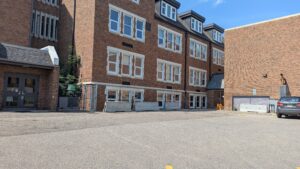
The image shows an accessible parking spot, which is located among other parking stalls, at the exterior of a large brick building with many windows.

Use of this stall requires a valid USask accessible parking permit and permission from Parking Services.

  • If you’ve been approved by Parking Services to use this stall, please contact that office to coordinate parking times for each of your exams, as needed.

Pay Lot Behind WILL
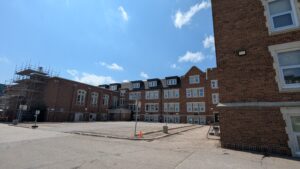
The image shows a small square parking lot that is located at the exterior of a large older brick building with many windows.

The pay lot directly behind WILL has a 4-hour time limit, enforced by USask Parking Services from 7:30 AM to 10:00 PM Monday through Saturday.

Payment may be made via the PayByPhone app or the stand-alone machines, which accept coins and debit/credit cards.

Cost varies, as follows (there is no daily maximum exit cost):

  • $3/hour → M-F,  7:30am to 6:00pm
  • $1.50/hour → M-F, 6:00pm to 10:00pm 
  • $1.50/hour → Saturday, 7:30am to 10:00pm
  • All surfaces are paved
  • Estimated time for persons with moderate mobility to reach WILL: 1 minute to an entrance with stairs or 2 minutes to the accessible entrance

Small Pay Lots Near WILL

There are two small pay lots near WILL. They both have the same rules regarding usage and cost, detailed below. A description of their locations follows separately.

COST/ENFORCEMENT DETAILS
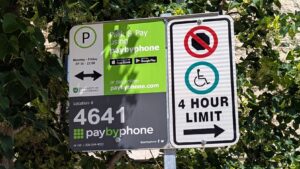
Close up of a parking sign, indicating the parking enforcement rules for the area as well as indicating the location of the accessible parking stall in the lot.

Each of the small pay lots near WILL has a 4-hour time limit, enforced by USask Parking Services from 7:30 AM to 10:00 PM Monday through Friday.

Payment may be made via the PayByPhone app or the stand-alone machines, which accept coins and debit/credit cards.

Cost varies, as follows (there is no daily maximum exit cost):

  • $3/hour → M-F,  7:30am to 6:00pm
  • $1.50/hour → M-F, 6:00pm to 10:00pm 
  • No charge on Saturdays

LOCATION DETAILS

Street Parking by Aspen Hall and Spruce Hall
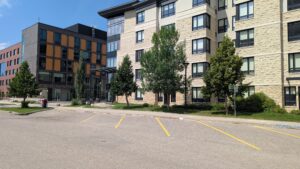
The image shows the exterior two large square modern buildings each about 5 stories high. The street in front of the buildings, including angled parking spots, is prominent in the foreground of the image.

  • Searchable on Google Maps as “Aspen Hall” and “Spruce Hall”
  • 10 angle-in parking stalls
  • Paved stalls and paths to WILL
  • Estimated time for persons with moderate mobility to reach WILL: 2-3 minutes

Gravel Parking Lot Next to Pine Hall and Birch Hall
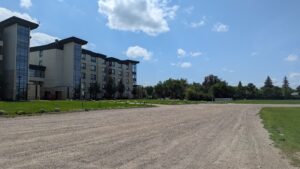
The image predominantly shows a gravel road and parking lot, with a large, modern square buidling, trees, and a big blue sky with clouds in the background.

  • Searchable on Google Maps as “Birch Hall”
  • If you wish to pay by machine, please use the one located at the small lot directly behind WILL
  • Getting to WILL requires passage on gravel and paved surfaces
  • Estimated time for persons with moderate mobility to reach WILL: 2-3 minutes

Stadium Parkade
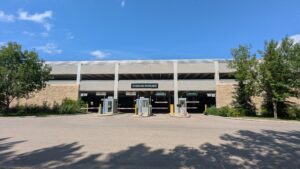
The image shows a blocky, concrete 3-level parkade, with a shadowed street in front, and blue sky overhead.

Stadium Parkade is one of the best options for students writing exams that are longer than 4 hours, since there is no time limit for parking at the parkade.

Cost varies, as follows:

  • $3/hour → M-F,  7:30am to 6:00pm ($15 daily maximum fee)
  • $1.50/hour → M-F, 6:00pm to 10:00pm ($6 night maximum fee)
  • $1.50/hour → Saturdays ($6 maximum exit fee)
  • Getting to WILL requires passage on gravel and paved surfaces
  • Estimated time for persons with moderate mobility to reach WILL: 4 minutes

Merlis Belcher Place
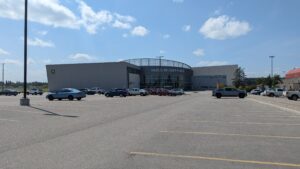
This image is dominated by a large paved parking lot in the foreground. There is a large modern building with a partial circular exterior in the background, and blue skies with clouds above.

Parking at Merlis Belcher Place is one of the best options for students with moderate (or better) mobility who are writing exams that are longer than 4 hours and/or seeking an economical parking alternative.

There is no time limit for parking at Merlis Belcher Place.

Cost without a valid USask parking permit: $2/hour or $6 daily maximum
Cost with a valid USask parking permit: FREE

  • NOTE: Free parking is not available when there is a scheduled event with sponsored parking.
  • USask Parking Services enforces paid parking from 8:00 AM to 3:00 PM
  • Getting to WILL requires passage on gavel and paved surfaces
  • Estimated time for persons with moderate mobility to reach WILL:  10-12 minutes

Parking on Nearby Residential Streets
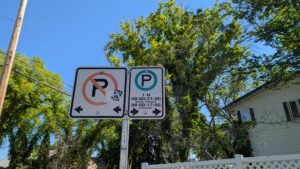
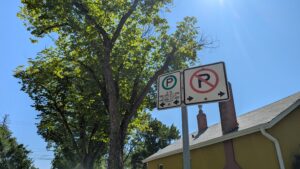
Close up of street signs indicating parking enforcement rules,with the area to the right of the sign designated for one-hour street parking, while all parking is prohibited to the left of the sign. Close up of street signs indicating parking enforcement rules, with the area to the left of the sign designated for two-hour street parking, while all parking is prohibited to the right of the sign.

Please respect posted signage. The residential area immediately adjacent to WILL has posted time limits of either 1 hour or 2 hours. In some cases, the limit is 1 hour on one side of the street and 2 hours directly across the street.

  • Parking on city streets is enforced by the City of Saskatoon
  • Hours of enforcement: Variable; please check signage near your vehicle
  • Cost: Free for posted duration
  • Getting  to WILL requires passage on paved surfaces
  • Estimated time for persons with moderate mobility to reach WILL: Dependent on vehicle location

Transit Options
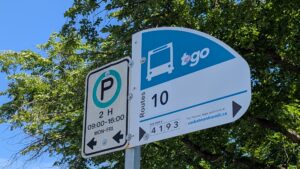
Close up of a street sign that indicates a bus stop for Route 10 on the right of the sign, and 2-hour parking to the left of the sign.

Route 10 stops on Cumberland Avenue, in front of WILL (stops 4192 and 4193)

  • Estimated time for persons with moderate mobility to reach WILL: 1 minute

Some routes stop on College Drive, about 2-3 blocks from WILL

  • Estimated time for persons with moderate mobility to reach WILL: 5 minutes, depending on stop location

Place Riel Transit Hub

  • Estimated time for persons with moderate mobility to reach WILL: 10-12 minutes

If you believe any information is missing or incorrect, please email us at aesexams@usask.ca

AES exam locations

Determining your exam location

During most of the year, it’s our goal to indicate all exam locations in Accommodate at least 2-3 business days before your exam date. During the December and April final exam periods, we strive to have all locations entered into Accommodate before the last day of classes.

You should receive an email about 2-3 days before each exam, with the exam location indicated.

You can also find out the location by logging into Accommodate.

If your exam is less than 24 hours away and you still don’t see a location indicated, email aesexams@usask.ca. If your exam is more than 24 hours away, please be patient.

Finding your exam location

Most exams will be written in our new AES Exam Centre in the Williams Building, which is located at 221 Cumberland Avenue.

If you’re unsure of any exam location indicated in Accommodate, please consult the campus map at this link: https://storymaps.arcgis.com/stories/73558aac156f41858fe4f4be232bbe49

Writing remote exams

Since remote exams can be written anywhere, we expect you will not write them at AES. We may be able to provide spaces for remote exams in extenuating circumstances. If you have nowhere else to write your remote exam, email aesexams@usask.ca.

Negotiating date or time changes for exams

If you need the date or time of your exam changed for accommodation reasons, please initiate a conversation with your instructor well before the AES deadlines.

Some accommodations that may require date and/or time changes include “morning exams only”, “afternoon exams only”, and “no more than one final exam per 24-hour period”.

You should approach that conversation as a negotiation and work towards agreeing on a new date and time that works for both of you.

That conversation can be broached by providing your instructor with a copy of your Accommodation Letter (AL), to remind them that you have a relevant accommodation on file with AES. In addition to providing the AL, explain why the scheduled date and/or time is problematic for you. Be prepared to provide supporting evidence, such as a list of your other exams/academic obligations. Suggest a new date and/or time of writing, but understand that your instructor may suggest a different date and/or time. The two of you should work together towards a mutual agreement.

*If you are registered in the College of Law, please discuss any date/time change requests with the Associate Dean Academic (ADA) and Student Services instead of your instructor.

*Please note that AES only supports date and/or time changes for accommodation-related reasons as on file with our office.

Understanding the difference between remote, online, and paper exams

At AES, we book your exam seat based on the accommodations you need + the format of your exam.

It’s critical that we know the correct format so that we book you into an appropriate spot. Please find out the format before submitting your request.

Remote exams can be written anywhere, using your own device.

On-campus online exams are written on campus using your own device.

Paper exams are written on campus, with a paper-based exam copy.

AES students must write the exam in the same format as the rest of the class.

(Please note: AES computers are provided to students who have “computer” as an accommodation. These computers are configured for word processing. If your exam format is online, you likely need access to the internet; please bring your own device for online exams.)

Using Accommodate to request exam accommodations

In most cases, if you need accommodations for an exam that will be written at the Saskatoon campus, please request those accommodations by:

  • Logging in to your Accommodate channel in PAWS.
  • Making sure that you’ve requested your Accommodation Letters. The system will not allow you to request exam accommodations unless you’ve requested these letters.
    • Remember that your AES advisor needs to approve your letter requests, which can take a few days. Please request your Accommodation letters early in the term, so that they are approved before you need to make an exam request.
  • Following the required steps in the “Exam Accommodation Request” tab.
  • If you need help with Accommodate, please view the how-to guide in the Accommodate Resource Library.
  • If you have a midterm in a lab, talk to your lab instructor before you submit your request. Lab instructors may provide accommodations directly for midterms.
  • If the class is not based at the Saskatoon campus, contact the student services staff at the class’s home campus to confirm the steps needed to get accommodations. Some external campuses/programs use Accommodate too; others use paper request forms.
  • If you have a remote exam that can be written anywhere, you should still request accommodations through Accommodate so that your instructor is reminded to adjust the timer for you.

Please always keep AES deadlines in mind:

Fall/Winter Terms

  • 2 full weeks (14 days) before any non-final
  • November 19 for any exam written on or after December 3
  • March 19 for any exam written on or after April 2

Spring/Summer Terms

  • 1 full week (7 days) before any non-final
  • 2 full weeks (14 days) before any final

*Tip! Locate the date of your exam on any calendar. Look straight up by one or two weeks to locate your deadline date.

NEW! Updated policy about fidget tools and noise-cancelling devices in exam spaces

Fidget/Stress Tools

Beginning Q1 (Spring Term 2025), ANY student is now permitted to bring in a fidget or calming tool such as a stress ball into the exam space.

You are NOT required to provide new documentation for this accommodation.

Please review the guidelines of these items so you are prepared prior to your exam:

  1. Limited noise to avoid distracting other students and staff in the same space
  2. Must not contain an open seam or zipper
  3. Small enough to fit in a hand
  4. Limited number of fidgets (invigilator will decide how many are reasonable given the space)
  5. May not be battery operated, have technology connectivity, or require charging

These guidelines are subject to change as situations arise that may affect testing integrity. If this occurs, we will update you.

Noise cancelling devices

Students will be permitted to use the following noise reduction devices in an exam: loop style earplugs, foam earplugs, over the ear noise cancelling headphones. These items will not be capable of connectivity or music/media playback. Students will NOT be permitted to use any headphones or earbud devices that connect to Bluetooth or can send/receive media/audio.

*Note that ALL items must be presented to the invigilator prior to the exam start for inspection. Should there be any concerns, an AES staff member will assist.