
✔️ Mathematical expressions and equations are created using dedicated editor tools and are accessible to screen readers (or, alt text / audio is provided where this is not possible).
Review These Explanations

Photo by Jeswin Thomas on Unsplash
In your online course, it is paramount to utilize dedicated editor tools for creating mathematical expressions and equations to ensure accessibility for all students. This practice is vital for fostering an inclusive learning environment, especially for students with visual impairments who rely on screen readers. Compliance with accessibility standards, including laws like the Americans with Disabilities Act (ADA) and Section 508, is facilitated by employing tools that generate accessible mathematical content. By doing so, you enhance the overall learning experience, allowing students to effectively engage with and comprehend complex mathematical concepts. The compatibility of these tools with screen readers ensures seamless access, while the provision of alternative text or audio descriptions becomes crucial in instances where direct accessibility proves challenging. Embracing accessible design not only meets legal and ethical considerations but also reflects a commitment to providing equitable educational opportunities for all learners in your online course.
Refresh Your Course with These Ideas
General Suggestions:
- Use chosen editor tools to directly create accessible mathematical expressions and equations.
- Add descriptive alternative text (alt text) to each mathematical element when supported.
- Consider providing audio descriptions for complex mathematical content that may require additional explanation.
- Surround mathematical content with descriptive context in the main text for better understanding.
- Select mathematical editor tools compatible with accessible formats like MathML.
- Provide transcripts or additional explanations alongside mathematical content.
- Regularly test course content, including mathematical elements, for accessibility using screen readers or testing tools.
- Include guidance on accessing and navigating mathematical content using screen readers or other assistive technologies.
- Contact technical support or instructional design teams for assistance with implementing accessible mathematical content.
- Stay updated on accessibility features and tools for mathematical content to continually improve accessibility in your course materials.
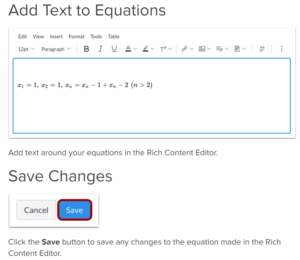
Example
Canvas
References:
Infrastructure Community. (n.d.). How do I use the math editor in the Rich Content Editor as an instructor?. Instructure Community. https://community.canvaslms.com/t5/Instructor-Guide/How-do-I-use-the-Math-Editor-in-the-Rich-Content-Editor-as-an/ta-p/816
- How do I use the Math Editor in the Rich Content Editor as an instructor?
- Basic equations
- Advanced equations
- Chemistry formulas, equations, and scientific notation
- Formulas OpenTextBC
- Kruger, R., De Wet, F., & Niesler, T. (2023). Mathematical content browsing for print-disabled readers based on virtual-world exploration and audio-visual sensory substitution. ACM Transactions on Accessible Computing, 16(2), 1–27. https://doi.org/10.1145/3584365