
✔️ Accurate captions or transcripts are provided to accompany audio or video materials.
Review These Explanations

Photo by Aaron Burden on Unsplash
In an online course, providing accurate captions or transcripts alongside audio or video materials is paramount for creating an inclusive and accessible learning environment. These accommodations cater to a diverse student body by ensuring that individuals with hearing impairments can fully engage with the content. Moreover, captions and transcripts offer flexibility to learners with different preferences and learning styles, allowing them to read and comprehend the material in ways that suit their needs. Beyond accessibility, these textual representations enhance overall comprehension, aid language learners, and facilitate content review.
Research indicates that captions and transcripts can benefit all students, whether or not they live with disabilities. Advantages of transcripts include strengthening student engagement, focus, retention of information, and comprehension of difficult or new vocabulary (Dello Stritto & Linder, 2017; Linder, 2016). Transcripts can also make it easier for students to quickly locate key points made in a multi-media presentation (Linder, 2016). By incorporating accurate captions or transcripts, educators demonstrate a commitment to equity, compliance with accessibility standards, and the proactive preparation of their courses for evolving educational needs and technologies. This practice contributes to a positive and inclusive online learning experience for all participants.
Transcript: is a written record of the spoken words within the content. It captures all dialogue, narration, or verbal information present in the audio or video file, offering a textual representation of the spoken material. Transcripts are valuable for accessibility, aiding those with hearing difficulties, and enhancing content searchability, comprehension, and review. They can be created manually or generated automatically using speech recognition technology, with manual review to ensure accuracy.
Caption: is a textual representation of the audio content in a video. Captions include spoken dialogue, sound effects, and other relevant audio information. They are typically displayed on the screen, synchronized with the corresponding moments in the video, to provide a comprehensive understanding of the auditory elements for viewers.
Refresh Your Course with These Ideas
General Suggestions:
- Choose a platform that supports captioning, ensuring compatibility with your Learning Management System (LMS) or video hosting service.
- Utilize automatic captioning services if available, and review generated captions for accuracy.
- Create caption files in formats like .srt or .vtt and upload them to your course platform, syncing them with the audio or video content.
- Manually add captions within the platform if automatic captioning is not supported, typing or pasting the transcript and synchronizing it with the content timeline.
- Consider using third-party captioning services for professional and accurate captioning services, if compatible with your platform.
- Encourage student contributions to captions, fostering community engagement and collaborative efforts.
- Provide guidelines to content creators and contributors on the importance of accurate captions or transcripts.
- Check and activate accessibility features on your platform to ensure students can easily access and enable captions.
- Educate students on the availability of captions or transcripts and provide instructions on how to enable them for an improved learning experience.
- Regularly review and update captions, especially after content revisions or updates, to maintain accuracy.
- Seek technical support from your platform if you encounter challenges in adding captions or transcripts, as they can offer tailored guidance and assistance.
Example
Transcribe Audio to Text (Screenshots from W3C Web Accessibility Initiative, 2020)
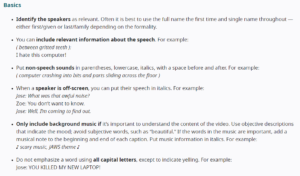
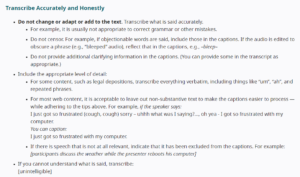
How to Add Automatic Captions to a Video in Panopto
References:
Dello Stritto, M.E. & Linder, K. (2017). A rising tide: how closed captions can benefit all students. Educause Review.
Linder, K. (2016). Student uses and perceptions of closed captions and transcripts: Results from a National Study. Corvallis, OR: Oregon State University Ecampus Research Unit.
W3C Web Accessibility Initiative. (2020). Transcribing audio to text. Web Accessibility Initiative (WAI). https://www.w3.org/WAI/media/av/transcribing/
- Soler-Costa R, Lafarga-Ostáriz P, Mauri-Medrano M, Moreno-Guerrero AJ. Netiquette: Ethic, Education, and Behavior on Internet-A Systematic Literature Review. Int J Environ Res Public Health. 2021 Jan 29;18(3):1212. doi: 10.3390/ijerph18031212. PMID: 33572925; PMCID: PMC7908275.
- Heitmayer, M., & Schimmelpfennig, R. (2023). Netiquette as digital social norms. International Journal of Human–Computer Interaction, 1–21. https://doi.org/10.1080/10447318.2023.2188534
- What is Netiquette? 20 Internet Etiquette Rules
- Discussing
- Open University